Thursday, November 9, 2017

How to Buy a working Clone GM Tech2 Scanner?

Has anyone bought/used one of Chinese Tech 2 scanner (clone)? If so is it any good? I ask this as I’m contemplating buying one. And there are soooo many versions of Tech2 clone; which one should i have?

Reply: Look the chart and tech2 review below. Maybe it can help you a lot.

  1. GM Tech 2 package difference:
Item NO.PackageWeight32MB CardCANDITIS2000 USB KeyHot or not
SP23Plastic Case5.1kgYesYesYes★★★★★
SP23-1Carton Box3.5kgYesYesYes★★★★★
SP23-BPlastic Case4.8kgYesYesYes★★★★★
SP23-B3Carton Box3.2kgYesYesYes★★★★★
SP23-CPlastic Case8.9kgYesYesYes★★★
SP23-DPlastic Case8.9kgYesYesYes★★★
SP23-D1Plastic Case8.9kgYesYesYesJust add 1 vci module (sp23-v)
All of GM Tech2 are same functions, they are just from different factory.
SP23,SP23-1 the same, just the package case is different, one is with plastic case, one not.
SP23-B,SP23-B3 the same factory, the packing is different, one is with plastic case, one not.

  1. GM Tech 2 accessory:
Item NO.NameFunction
SO22-B32 MB CARDneed more cards, buy so22-b to add
SP23-ZGM Tech2 Main UnitGM Tech 2 Multiplexer
SP23-VGM Tech2 VCI moduleVCI
SP23-JGM Tech2 KeypadKeypad
SP09-BGM Tech2 CANDICandi with express shipping
SP09GM TECH2 CANDICandi with post shipping
SF63Main Test Cable for GM TECH2Main Test Cable
SO104OBD2 16PIN Connector for GM TECH2OBD2 Cable
SO01TIS2000 USB Key for GM carsWork with Tech2 for GM cars’ programming function before 2007 year.
SO01-BTIS2000 USB Key for SAAB carsWork with Tech2 for SAAB before 2008 year cars’ programming.
SP235ISUZU DC 24V Adapter Type II for GM Tech2can do ISUZU 24V truck


So, it’s worth having a Tech 2 clone?

It’s a customer review. Read it and get the truth.

Received the GM Tech 2 clone today. Five days from China, not bad for free shipping. Checked it out and everything is working fine except the AC-to-12VDC power adapter (dead). No problem, because I can get one anywhere for $5. In short, that is a nice piece of equipment to have, very nice!
Aside from working beautifully with OBD2, the tech2 is the scanner for GM OBD1 to use. with the right software (plug in chips like nintendo cartridges) it’ll do some daewoo/suzuki, GM medium duty (meaning bigger than 3500 using non automotive OBD2 standards), and other in the GMdistant family tree too.
In addition to generic codes (P0000-P0999) It’ll do all the proprietary GM codes (P1xxx), actuators, and systems. you can also view fuel trims, emissions readyness (beyond a green LED for all OK) and It’ll talk to ALL the modules rather than just the ECM (and if you get into the $250+scanners, ABS) like BCM, SIR, entertainment, EVERYTHING on a GM. At school I used one with a 91+ cartridge on my 87 S10, so going back further is hit or miss but possible.
To adjust shift points and fuel consumption and Speedo, forget it.
The TECH2 can’t do any sort of modding/tuning, only upload GM flashes. At least with legitimate software. I’m sure someone has custom software to do it but there are easier ways nowadays.
Is it worth if you just want to read/clear codes on your own car once in a while, heck no. If you’re doing a lot of work on GMs or want to get a lot more in depth with your car, it’s worth the money.
No comment on China knockoff quality, I mean a working tech2, Chinese made or not.
See my GM tech2 scan tool. It’s working well.
clone-gm-tech2-1clone-gm-tech2-2clone-gm-tech2-3clone-gm-tech2-4clone-gm-tech2-5

Wednesday, May 24, 2017

Tech2 Opel Vauxhall 184 bins & GDS2 2017 Download Free

This is a collection of the current version of Opel Tech2 Vauxhall 184.000 .bin files download free for everyone that uses it for diagnostics in all the 26 languages that it comes in.

Free download Opel Vauxhall 184.000 bins
*The .bin files also work with Tech2Win.

Free download Opel Vauxhall GDS2 deliverable.rar
*This included the Opel Vauxhall deliverable package (1/2017) for GDS2 Diagnostics.


Here are something to those new to this....

Where do I put files please?

The .bins are for either programming your Tech2 32mb memory card with or used with Tech2Win on your computer.

For Tech2Win you can put the .bin anywhere you want just point Tech2Win in the location of where you put it so it can boot it up.

For example:

Start Tech2Win, Select Modify / View, Click the grey square to the right that says create new, in the drop down box on the left select default, in the Please enter new name box to the right name it Opel184 Bin, Click Copy then ok, Now click the grey square to the right of where it says "Slot 0: memory card image location" and in the pop up window find the location where you put your .bin file and click on it then click on Save in the lower left hand corner then ok. Now click on the greenish square named Opel184 Bin to boot the .bin up in Tech2Win.

For the Tech2 memorycard You need to have another software called "Memory Card Explorer" to program the .bin to your memory card with in the pcmcia slot in an old laptop that has it, or another software called "Card Writer" to program your Tech2 memory card in the Tech2 connected to your computer with a J2534 connection the same as you would connect your Tech2 to your computer for SPS programming.

How is GDS2 updated?

This is a copy that someone had posted this info in another post but it here for you all to make it easy. If this don't work, you may need a newer version of GDS2 software if your is very old just so you know just in case of that happening

1. Select to show hidden files and folders in windows.

2. Put deliverable in location below and remove current deliverable in there,

C:, ProgramData, GDS 2, PersistentData, Downloads, DataBackups

3. Start GDS 2, and go to Manage Diagnostics Packages, click on Browse, in the open window find the deliverable at the same location you put it in above, click on it and then click open. GDS 2 will restart, Close out of GDS 2.

4. Go back to this location,

C:, ProgramData, GDS 2, PersistentData, Downloads

5. Go in folder "CurrentRelease" copy file "deliverable_OpelVauxhall v2017.01.0" and place into folder "Deliverables" and delete the file that is in there so there isn't two different ones.

6. Restart GDS 2 and it should be up and working to diagnose.


* Credits to spkmal2 in the MHH community.

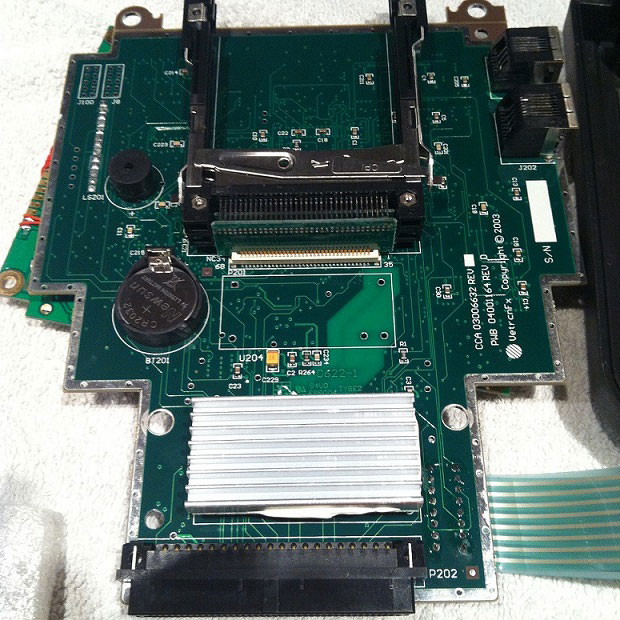
How to replace GM Tech2 DC to DC converter to boot up

This is how to rework GM Tech2 PCB to make Tech2 scan tool clone boot up for use.

– Problem
Tech II clone not boot up (not turn on)

– Reason
The issue usually results from the DC to DC converter

This converter is a common internal component for the device GM TECH II
originally these come equipped with the “Meanwell SKE10A-05VT” and “BTCPower 4BE-01T-02”
you cannot longer purchase these items because they are not being manufactured anymore

You actually can find the “Meanwell SKE10A-05” but missing the “VT” and also missing 1 pin for the soldering points.
BEWARE this model dc to dc converter WILL NOT WORK
It may help you power on your device, but the power button among other programming features won’t work.

– Solution worked!
To replace DC to DC converter can avoid unpleasant surprises.

REC10-1205S/H2/M has a 6 pin connections, “Meanwell SKE10A-05VT” and “BTCPower 4BE-01T-02” have a 5 pin connections, is it not a problem when you change the component.
So, sort this out.

This list is for a DC to DC converter with the following specifications:
Input: 9~18VDC
Output: 5VDC 2.0A

– GM Tech 2 PCB before the DC to DC converter replacement
replace-gm-tech2-dc-converter-1
– Tech2 clone worked gain after the DC to DC converter replacement
replace-gm-tech2-dc-converter-2
replace-gm-tech2-dc-converter-3
– The important note: Tech2 not boot up when the car starts
So, how to fix a reboot Tech 2 when starting the car? The square dedicated native voltage Stabilizer, black spots, this is how it is better to feed on, immediately giving to drink block, then the main Board gently giving to drink lagged behind in her legs. By means of wooden toothpicks carefully remove the solder prepared under us new voltage regulator (mornsun VRB1205LD-15W DIP).
replace-gm-tech2-dc-converter-4
* To avoid boot-up issues, had better buy a high-quality Tech2 clone from a man of his words to trust in. This is a good one you can try with great reviews/feedback on forums: http://www.obdii365.com/wholesale/gm-tech2-gm-diagnostic-scanner-with-32mb-card-tis2000.html

https://eobd21.wordpress.com/2017/05/25/replace-gm-tech2-dc-to-dc-converter/

Thursday, April 13, 2017

GM Tech2 Vetronix Feedback Yes and NO (Comprehensive, All Here)

This article includes all GM Tech2 Vetronix feedbacks Yes and No list, aiming to help the GM technicians who are new to GM TECH2. 

Before continuing reading, please note GM TechII works not on truck; go for VXDIAG VCX HD for truck.

GM tech2 Vetronix to test OK
Item No. SP23-C, with Candi interface for C6, $349 (bought from obdii365.com)
Item No. SP23, $285 (cheapest)
I have no other GM Tech from the same shop, but as I know some guys test ok too.
gm-tech2
How to use GM tech 2?
Plug and play, no need install on computer.
GM tech2 Youtube Video: https://www.youtube.com/watch?v=r9LFe-sS3zs
gm-tech2
Test Report:
Remind: press Ctrl+ F to search is easier.

Part 1: Feedback Yes
- Used my GM tech II to retrofit tcs and marry a non divorced cd changer.

- reads everything a genuine one does. Heck, it's probably made in the same factory as a genuine one with a different sticker on it. Pinpoint bad air bag sensors, turned on the tpms on both our Z's.

- It works exactly like any others I’ve used at gm dealers over the years

- $339 for a brand new tech2 with a CANDI module all the cables and adapters and case is great
-connected to my intimidator ss and everything was there

- Change one of my c5s that is canadien to US to disable the auto headlights because they don't always open when they should and when they do work right they come on too early.

- You have to specify GM English when you order the unit. There are a lot of other cards for different languages Saab, Holden, etc

- Is now fully functional for F body, C5 and C6, It cost me a lot more than the initial $1000 that I thought was a good deal.

- Plugin to my '08 93 Aero and play around with the typical body and key features. My primary reason for picking up the Tech II was to program a spare key. I figured ~$500+ at a dealer or ~$400 on my own would be well worth it...obviously if I received a working, defect free, unit.

- Programming a key and changing some of the standard comfort features.

- Able to get security access using an old Dell laptop from my IT guy's graveyard.

- Programming a new key was easily as 1-2-3

- Changed my key-unlock settings to all at first press, and then lock on drive off/open on key out was a snap.

- If you had a Tech2, you could possibly talk to the dealer and have them access their TIS system to load the BCM or PCM calibration to your Tech2. Some may do it.
If you can't do that, just buy additional TIS2000 with USB key.

- Hooked it up to test engine, ABS, transmission etc, stored DTCs, Freeze Frame, live data all the test result were displayed on the large, easy –to-read backlit screen. It helped to carry out accurate and stable diagnostic function.
- Compared with GM MDI, Tech2 covers more vehicles including OPEL, GM, SAAB, and Isuzu.

-used it on my GMC for air bag warning

-Tried it on my 2006 Silverado & worked ok.

- The tis 2000 needs windows XP, Vista, win8.1, Win 7 32 bit.

- Able to easily and completely program out the TPMS system

- I have used mine to do two crank sensor re=learns and did the brake bleed on mine for the EBCM flush and it worked fine

- I am fairly certain it works on all GM cars til 2013. I have used it on my 03 GMC full size pickup, and my sisters 07 Trailblazer !!!! (and my 99 vette of course).

-If you have a 1997-2000, the TPMS is in the firmware and cannot be programmed. With the addition of the Z06 in 2001-2004, it can be programmed.

- Bleed the ABS ok.

- Used to cycle and bleed the ABS brakes on my C6 ok

-Plugged it in to my 2011 Z06, and activated the Afterblow feature. I also cleared some old DTC codes that were in history. It works just fine and the quality feels genuine. It's a pretty good knock off. Even came with all of the stickers from the Veltronix manufacturer. I assume they are knock off too.

- Used it to program my key fobs for my malibu but also have 4 other chevys


Part 2: Feedback NO
- GM tech2 would NOT work with All C5's, if you are going to use it on a C6,, make SURE you have the CAN D modules.
- Cars only, no trucks, be advised to use Allscanner VXDIAG VCX HD heavy duty scanner.
vxdiag-vcx-hd
….To be continued…

Sunday, March 5, 2017

GM Tech2 Program 2007 Cadillac CTS-V Key Fob


This is an instruction on how to program key fob to 2007 Cadillac CTS-V using a GM Tech2 Tech II scanner.

Model: 2007 Cadillac CTS-V
2007-Cadillac-CTS-V
The process…here you go…

The key to be programmed
key-to-be-programmed
Insert the key and ignition on
ignition-on
The gm tech 2 scan tool power on


In the main menu, go to Diagnostics

Select model: 2007 Cadillac D (DN) CTS-V passenger car
select-vehicle
passenger-car
cadillac
select-D
CST-V
Then go to Vehicle Control Systems
vehicle-control-module
communication
Read vehicle info
Engine type: (U) 6.0L V8 LS2
select-type
Go to Module Setup
module-setup
Then Remote control door lock receiver
remote-control-door-lock
Program key fobs…
program-key-fob
Two key fobs to be programmed
2-key-to-be-programmed
Tips of programming key fobs:
All key fobs must be programmed each time any one fob is programmed. To program,press and hold the LOCK and UNLOCK key fob buttons prompted by the TECH 2. Programming takes 15-30 minutes….
Tips-of-programming-key-1
Tips-of-programming-key-2
Programmed complete and test it’s working.
Done!